

TK688 withdrawal is a process that many users are interested in when they want to transfer funds from their account to a selected payment method. The withdrawal process consists of several specific steps, so before submitting a request, users should check the withdrawal limits, recipient account information, and the conditions applied by TK688 to each payment method.
Valid conditions for requesting TK688 withdrawal
Before making a TK688 withdrawal, users need to meet all applicable conditions for their account and selected payment method. Carefully checking the following requirements can help minimize the possibility of a withdrawal request being rejected or delayed.
- Logged-in account: Make sure the account is functioning normally and can access the Withdrawal section.
- Eligible balance: The available balance must cover the desired withdrawal amount and meet the required minimum limit.
- Accurate receiving information: The receiving account or wallet must match the information required by the system.
- Promotion requirements met: If a promotion is being used, any related conditions must be completed before submitting a withdrawal request.
- Complete transaction information: Review the amount, receiving method, and account information before confirmation.
How to link an e-wallet before withdrawing from TK688
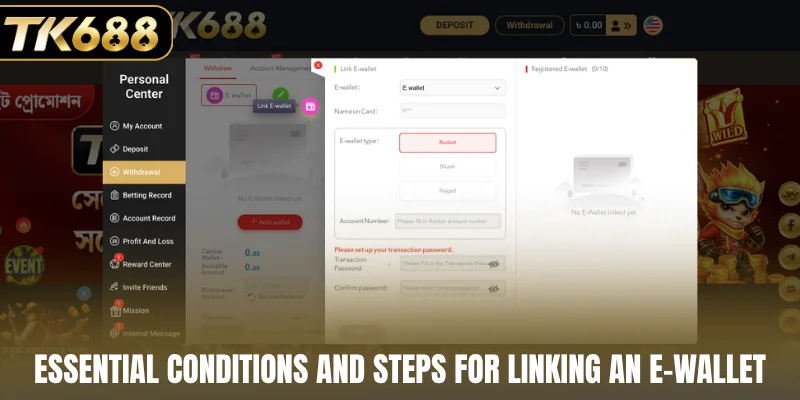
To ensure smooth withdrawals, users need to link an e-wallet to their TK688 account before creating a request. Enter the exact wallet details and set a transaction password to complete the linking process:
- Step 1: Go to Link E-wallet and select E-wallet.
- Step 2: Enter Name on Card matching your e-wallet account name.
- Step 3: Choose your wallet type under E-wallet type: Rocket, BKash, or Nagad.
- Step 4: Enter the Account Number of the receiving wallet.
- Step 5: Set up a Transaction Password, then re-enter it under Confirm password.
- Step 6: Review all details and click Submit to complete the linkage.
TK688 withdrawal guide
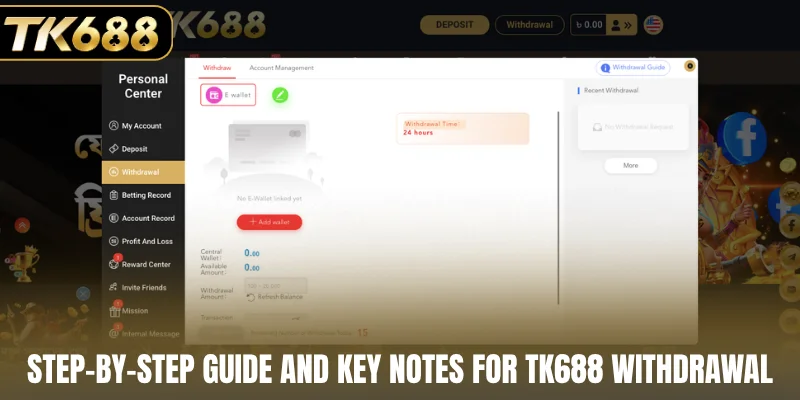
TK688 withdrawal is performed directly in the Withdraw section, with steps ranging from linking a receiving wallet to entering the withdrawal amount and confirming the transaction. Players can follow the sequence below to complete a withdrawal request:
- Step 1: Access Withdraw and select Add wallet to link a receiving e-wallet.
- Step 2: Check your Available Amount, then enter the desired sum in Withdrawal Amount.
- Step 3: Enter your Transaction Password and double-check all transaction details.
- Step 4: Click Submit to send the TK688 withdrawal request.
Notes when withdrawing from TK688
When making a withdrawal from TK688, users should carefully review the information before submitting a withdrawal request. Paying attention to the receiving wallet, available balance, and transaction password can help minimize errors during the process.
Check the receiving wallet before withdrawing
Make sure an electronic wallet is linked to the account before creating a withdrawal request. The wallet information should be accurate to avoid sending funds to the wrong address. If the system displays “No E-Wallet linked yet,” users can review the Add wallet option to link a wallet. It is recommended to check the wallet information again before continuing.
Monitor the available balance
Before entering a withdrawal amount, check the Available Amount shown in the Withdrawal interface. The requested amount should fall within the account’s available balance. If the balance has not been updated, users can review the Refresh Balance option to check again. Avoid submitting a request that exceeds the available amount.
Enter your transaction password correctly
Transaction Password is required to confirm a TK688 withdrawal request. Users should enter the transaction password they have previously set accurately. Avoid entering it incorrectly multiple times or sharing the password with others. After entering the information, review it again before submission.
Monitor the withdrawal request status
After submitting a request, users can check the Recent Withdrawal section to monitor the transaction. If the request does not appear, review the transaction history or refresh the page. Users should also pay attention to the remaining number of TK688 withdrawal requests allowed for the day as displayed on the account.
What to do when encountering TK688 withdrawal errors?
During TK688 withdrawal, users may encounter issues when linking a wallet, entering an amount, or submitting a withdrawal request. Checking each possible cause can help identify an appropriate solution and minimize the impact on the transaction.
Unable to link the receiving wallet
If a wallet cannot be added, check the wallet information entered in the withdraw account management section. Check that all required fields are filled in correctly. Users should also check their network connection before attempting the process again. If the issue persists, refreshing the page may help update the system before checking the wallet connection again.
Withdrawal amount is not accepted
When the system does not accept the withdrawal amount, check the Available Amount section. The requested amount should not exceed the available account balance. If the displayed balance is inaccurate, review the Refresh Balance option to update the information. The withdrawal request should then be reviewed based on the available balance and applicable limits.
Error when confirming a withdrawal request
If a withdrawal request cannot be confirmed, check whether the Transaction Password information is correct. Make sure there are no unintended spaces or incorrect characters. Users should also review all transaction information before submission. If the confirmation issue persists, refreshing the page may help resolve a temporary system error.
Withdrawal request is not recorded
If the request does not appear in Recent Withdrawal after submission, check the transaction status and allow time for the system to update. Users can also review the withdrawal history and applicable daily request limits. If the request still does not appear, contacting the platform’s support team may help clarify the status.
Tips for the fastest TK688 withdrawal
For TK688 withdrawal to be processed smoothly, users should prepare all relevant information before submitting a request. Reviewing the available data carefully can help minimize errors that may interrupt the transaction.
- Link the wallet beforehand: Make sure the receiving wallet has been added and the information is accurate.
- Check the balance: Confirm that the Available Amount is sufficient for the intended withdrawal.
- Enter the correct amount: Select a withdrawal amount that falls within the limits allowed by the system.
- Check the password: Make sure the Transaction Password information is correct before submitting the request.
- Monitor the request: Check Recent Withdrawal after submission to review the transaction status.
Conclusion
TK688 withdrawal provides a withdrawal process covering several stages, from linking an electronic wallet and reviewing the amount to confirming the request. Users should carefully check the E-wallet, Account Number, Available Amount, and Transaction Password information before submitting a request. Choosing the appropriate receiving method can help minimize errors during processing.
